Know what to build
Turn a loose idea into a simple, useful website brief.
Go from a blank page to a portfolio you can open, understand and change. Start with a free, hands-on lab. Explore websites, apps and automations when you’re ready for more.
No payment. No coding experience required.
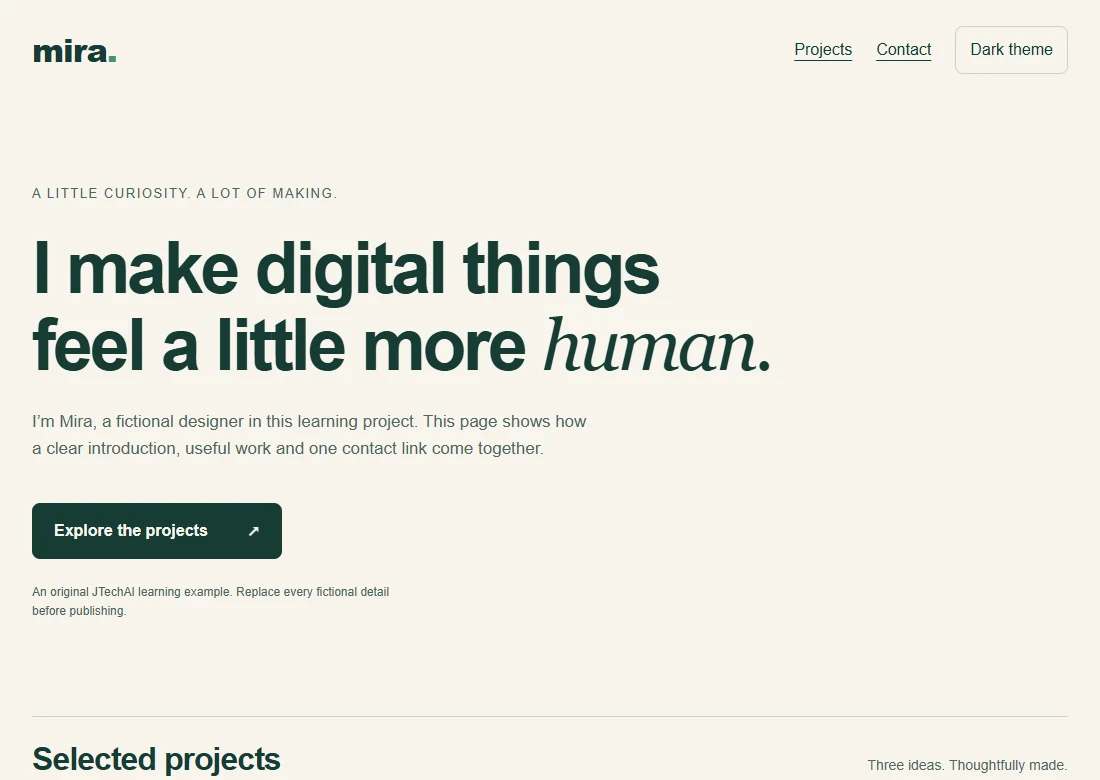 Try the working website
It’s easy to collect prompts and still wonder where to start. Give yourself one small project, a clear order and a useful task at every step.
See your starting pointTurn a loose idea into a simple, useful website brief.
Write a prompt with clear requirements and make one change at a time.
See what HTML, CSS and JavaScript each do in your project.
Check your layout at different sizes and fix what gets in the way.
Use a practical review before putting your example online.
Take the source files, replace the examples and try your next improvement.
A working portfolio you can explore today. A guided lab that takes you from a clear brief to checking your own version.
Explore the portfolio introduction, three sample projects and an email contact link. Return to the top, switch the theme, and see the layout at mobile width. Mira is a fictional designer used for this learning example.
Preview the lessons and download the files before signing up. Paid courses are separate.
See the kinds of projects the wider school is preparing. Each example follows a clear path: understand the idea, build a first version, then test it.
“Build a portfolio website for a design student, with a project gallery and a contact form.”
“Build a habit tracker app with daily reminders and a weekly progress view.”
“When someone fills my enquiry form, save it to a sheet and send them a personal reply.”
“Build a client dashboard with login, project status and invoices.”
The next chapter: paid courses are in preparation. Explore a syllabus and join its waitlist; enrollment is currently closed.
You will build a personal portfolio site, live on your own link.
You will build a landing page with a working enquiry form.
You will build a habit tracker you can install on your phone.
You will build a dashboard that reads and updates a spreadsheet.
You will build an enquiry-to-sheet workflow you can test end to end.
You will build a support assistant that answers from your documents.
You will build a working first version with login and payments.
You will build a client portal with project status and invoices.
Try another topic or explore the full catalogue.
Five starting points, each with a first project chosen for it. Pick yours and we’ll suggest the right course.
A guided learning path from a clear brief to a final project. Program enrollment and the teaching schedule will be announced when ready.
Start with the free lab today. These paid learning paths are in preparation; their course pages explain what is planned.
Pick one project and focus on making it work.
A wider library for people who want to keep building.
A structured path from first prompt to final project.
Looking for live learning? Explore the founding cohort · ₹9,998. Read the refund policy before purchasing.
You don’t have to have it all figured out. Choose the thought that sounds most like you.
You don’t need coding experience for the free lab. Follow eight written lessons, try each small exercise, and use the supplied project when you want to see how the pieces fit.
Read the first lessonThe starter lab takes an estimated 60–90 minutes including practice. You can spread it across a few sessions. A free verified account lets you save your progress, bookmarks and private notes.
See the eight small stepsRead every starter lesson, open the project and download its source files without a payment. A free account is optional for saving your learning. Paid courses are separate; starting the lab does not subscribe you.
Start the free labThe working portfolio and editable files are available to preview. This is a written starter course with exercises and a short silent walkthrough, so you can judge the teaching format before creating an account.
Preview the project and lessonsEach lesson ends with a practical task. You’ll change the example content, check the mobile layout and review what needs attention before sharing. The goal is a first version you understand and can keep improving.
Try the first exerciseHave a different question? Ask us and we’ll help you find a suitable starting point.
Read the refund policyYour First Website: the Starter Lab includes eight written lessons with exercises, a working portfolio example, editable source files and a short silent walkthrough with captions. You can preview it without an account. A free email-verified account saves your progress and private notes.
Allow an estimated 60–90 minutes for the starter lab including practice, or work through it over several sessions. Use a computer, a browser, a text editor and an AI assistant of your choice. No specific paid AI tool is required for the lab. Other courses may have different tool requirements.
Beginner courses introduce the ideas in plain language. Intermediate courses assume you are comfortable exploring screens, data and basic application logic. Check the level on each course before you choose.
Each course shows the project you will work towards. The aim is a working first version you can open, explain and improve. Check the published syllabus for the lessons and resources included.
A learning project is a first version. Real use can require more testing, security, privacy and deployment work. JTechAI makes those next checks part of the learning process.
The new paid courses are being prepared and enrollment is currently closed. Explore the syllabus and join a course-specific waitlist from its page. The free starter lab is available now. Existing purchases and published lessons remain available in your learner dashboard.
After a verified payment, course access is linked to your purchase email. Sign in to return to your lessons, bookmarks and saved progress.
The published CtrlBox refund policy applies to paid purchases. Read the policy linked beside checkout before paying, including its digital-access restrictions. The free starter lab requires no payment.
Give it a brief. Open the project. Make one change.
Your first build can start with that.
P.S. You can preview the lessons and download the project before creating an account. Start small, see if the format suits you, and keep building at your own pace.